
Device Setup
Prepare each source to send the information you want to investigate in NeQter. Configuring collection and enabling a dashboard are separate steps: a dashboard can display only data that has reached the appliance.
Choose a collection method
| Source | Set up collection | Continue with |
|---|---|---|
| Windows or Linux host | Install the appropriate NeQter agent, then configure its group under Hosts. | Agents and groups |
| Active Directory domain controller | Collect Windows events and configure the audit policy that generates the required events. | Active Directory |
| Windows file server | Collect Windows events, enable the relevant file-system audit policy, and audit the intended folders. | File Monitoring |
| Firewall or network device | Configure a matching NeQter syslog input and the device’s remote logging destination. | Firewall Setup |
| Cloud service | Authorize the appropriate API collector under Settings → Inputs. | Input Configuration |
Connect an agent host
- Obtain the current agent installer and deployment instructions for the host’s operating system from NeQter Support. Confirm the appliance address and required network connectivity before installation.
- Install the agent using those instructions.
- Open Hosts → Agents, choose a time range that includes the new agent’s first report, and select Refresh.
- Find the host and check Last seen, addresses, and group membership.
- New hosts are placed in the Default group. Move the host to another group if it needs different collection settings.
- Open the Groups view and select Edit group for the host’s group. Under Logs, choose the operating-system tab and enable the required collectors. Select Save to apply the group configuration.
- Verify a new event in Discover before relying on a dashboard or alert.
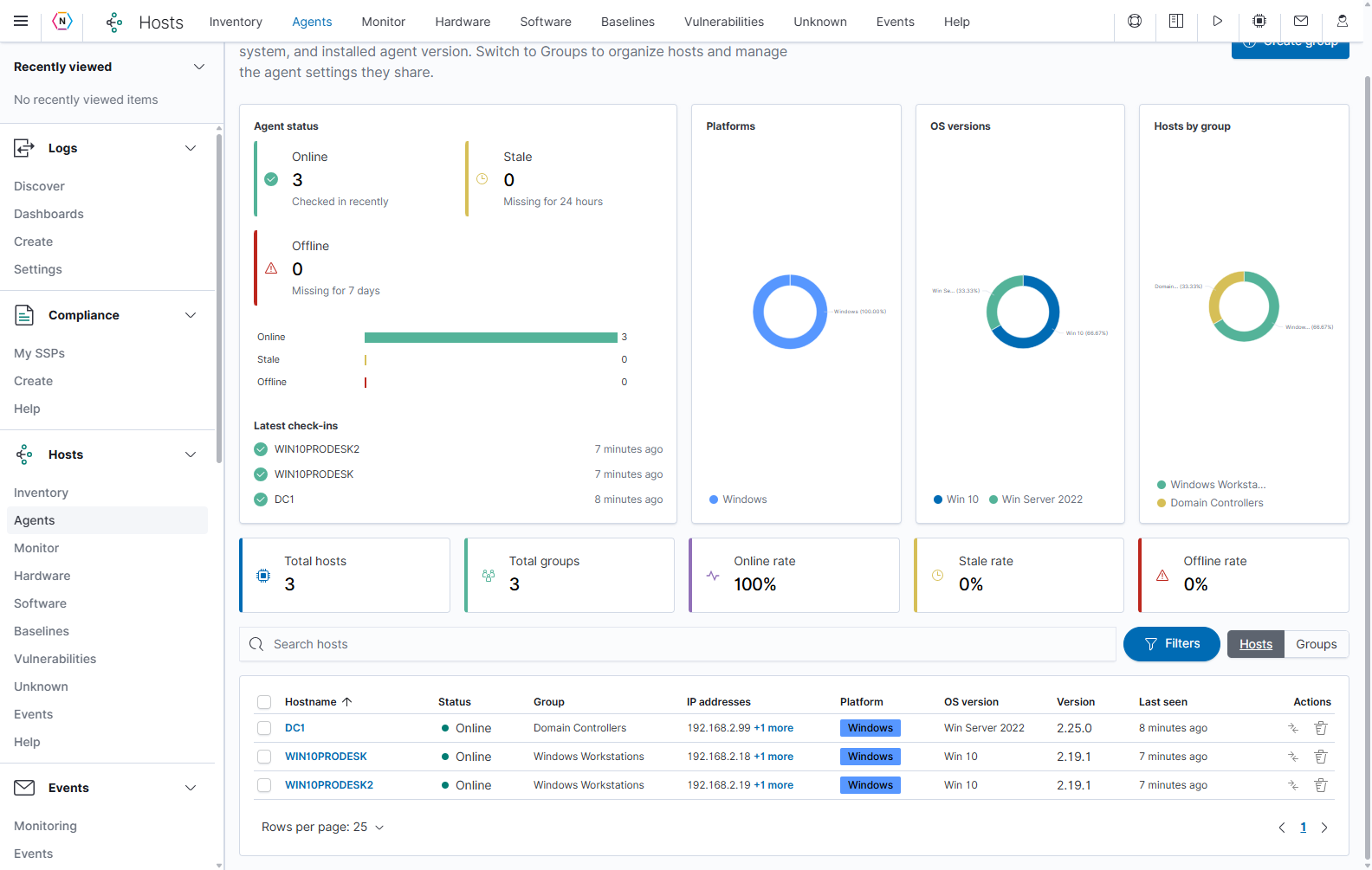
Use the Agents table to confirm that a newly connected host is reporting and belongs to the intended group. Example hostnames and addresses vary by environment.
Group changes affect the hosts assigned to that group. Review the collection settings before moving a host into another group. The Hosts guide explains Metrics, Audit, Winlog, and Files, along with the event-ID picker and file-path controls.
Continue setup
Follow the source-specific guides above, then use Input Configuration for syslog and cloud collectors. Use Settings → Dashboards to enable the supplied dashboards for your collected sources.