

Converting SSPs Guide
Use Compliance → My SSPs → Convert SSP to create a separate System Security Plan in another supported framework using responses from an existing plan. Use Copy SSP when you want a separate plan in the same framework. Both workflows require manager access.
Prepare the conversion
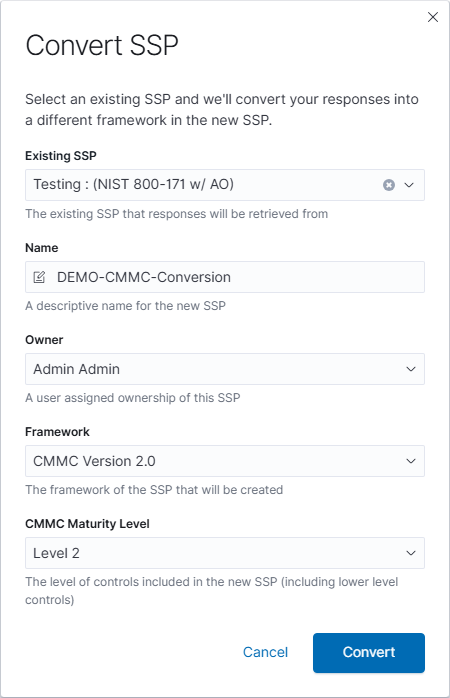
- Open Compliance → My SSPs and select Convert SSP.
- Select the source under Existing SSP.
- Enter a descriptive Name for the new plan and choose its Owner.
- Select the destination Framework. The available choices depend on the source SSP.
- When CMMC is selected, choose the CMMC Maturity Level.
Review and create the new SSP
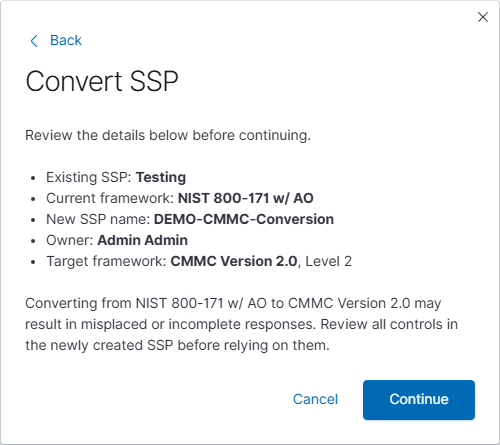
- Select Convert to open the review screen.
- Check the source SSP, current framework, new name, owner, and target framework and level.
- Read the response-mapping notice. Back returns to the form; Cancel leaves without creating a plan.
- When the details are correct, select Continue to create the separate SSP.
Review the converted content
Open the new SSP from My SSPs. Requirements do not always map directly between frameworks, so responses can be incomplete or appear under a different control. Review the control text, implementation status, response, evidence, and remaining work before relying on the new plan. Confirm the artifacts and assignments needed for each control instead of assuming the conversion is a complete backup.
See the Compliance guide for related copy and conversion workflows and Requirements and controls for reviewing the plan.